Tuesday, February 10, 2015

6 Top Ways To Check Internet Facts

6 Top Ways To Check Internet Facts

February 9th, 2015 10:49:00 am
6 Top Ways To Check Internet Facts
When I was 5 years old, my mother always told me that happiness was the key to life. When I went to school, they asked me what I wanted to be when I grew up. I wrote down “happy.” They told me I didn’t understand the assignment, and I told them they didn’t understand life. ~ Unknown
Oh my gosh! Unknown?! What are you talking about unknown?! John Lennon said that! Why don’t you give credit where credit is due?
Man, did I take it on the chin for that! But guess what? Before I post anything, I work hard to assign proper credit to the author. Unfortunately, I could not find any reference to an actual interview or written work where John Lennon (or anyone else for that matter) said or wrote this. It first began appearing on Tumblr circa 2008 and seems to be the combo of a Charlie Brown cartoon strip from 1960 and actress Goldie Hawn’s 2005 memoir.
But the power of public opinion and mass persuasion is very strong and frankly, since I started my page about three years ago, I never faced such hostility.
So what’s the deal? It’s not surprising to me that people are so easily persuaded. After all, my automatic brain theory holds true in most of my life observations. That is, our primitive nature works to protect us from danger, threat, or vulnerability and it has evolved to instinctively detect safety in numbers. (We have a divine nature too but that’s not what’s operating here).
A modern term, “viral”, fits with this. Viral may be a collective laugh by the masses or the development of a common belief. Either way, it spreads like wildfire and once it takes hold the individuals who are a part of the viral spread feel protected by the masses on their side—they feel affirmed, validated, and, hence, protected.
But we all know the dangers of mass persuasion and uncritical devotion to a particular doctrine, philosophy, belief, or authority figure. Remember a guy named Hitler? In 1963, psychologist Stanley Milgram performed the now infamous Milgram experiment at Yale University. In summary, the experiment consisted three participants: a director, a “teacher”, and a “learner”. The latter was separated from the former two by a wall. The director instructed the teacher to administer increasing electric voltage to the learner, when the learner could not answer a particular word problem. The director informed the teacher that this is how one learns and they must continue or the experiment would not work. The direction became increasing stern and forceful, as the teachers grew more uncomfortable. The teachers had no way of knowing that the shocks were not real. Under increasing pressure, 60% of them ended up administering the highest electric shock, despite noises indicating the learner was in much distress. This experiment has been duplicated elsewhere.
 So, what does this have to do with our trust in what we read, see, or hear? Well, it just means we need to be careful about following public opinion or blindly following. We also must be on guard to avoid reflex acceptance or rejection.
I certainly have done my fair share of reflexively and mindlessly commenting on an RIP post or a quotation before and have learned from my mistakes. But before you join that next revolution, I suggest taking a few steps to check it out.
1.       Google It
That simple. Really, it only takes a couple seconds. You will find out pronto whether your beloved soup opera star of the eighties is really dead. Don't stop on the first page. go a few pages in so to bypass the current trend or buzz as it may not be accurate.
2.       Wiki It
Wikipedia is an incredible encyclopedia. Granted it is not always 100% correct, but it is enough of the times that will help you separate most fact from fiction.
3.       Try Snopes.com
This is an “urban legend” site. I have found this site fairly accurate. Although, over the years, I have noticed a somewhat liberal leaning bias in some of its hashing out of politically driven rumors or "legends". 
4.       Check Out TruthOrFiction.com
Similar to Snopes, but perhaps a less partisan version of it.
5.       Search QuoteInvestigator.com
The name says it all! Before you attribute a quote to a particular person, I suggest visiting this site. Just sayin’!
6.       Visit Medscape.com
This is a decent resource to all things medical. Of course, they do have a bias toward conventional thinking, however, they do also give you an opportunity to search for any particular compound, such as vitamin or herb and give a fairly accurate description. 
**********************************************************************************************************
Before you believe everything you read, I suggest checking out these “fact-checking” sites. They will give you the ability to formulate an informed opinion rather than simply following the crowd. I think John Lennon knew a thing or two about following the crowd and I think if he were around today, he would hesistate before jumping on the band wagon. 
© Dr. Charles F. Glassman, CoachMD

Wednesday, February 4, 2015

10 Romantic Ways to Celebrate Valentine’s Day

Valentine’s Day offers lovers many ways to express their emotions. Perhaps one of these will inspire you. Many people around the world celebrate Valentine’s Day by showing appreciation for the people they love or adore. Some people take their loved ones for a romantic dinner at a restaurant while others may choose this day to propose or get married. Many people give greeting cards, chocolates, jewelry or flowers, particularly roses, to their partners or admirers on Valentine’s Day. It is also a time to appreciate friends in some social circles and cultures.
Valentine’s Day is just around the corner. Whether you are spending the day with a special someone or getting together with friends, here are some most romantic thing and ways that you can do on a day that’s set aside for love.

10. Enjoy Valentine’s Day Alone

Celebrate being hot and single, and enjoy some time to mingle. Who says that people need a companion for this one day of the year? Treat yourself to a spa or a long bubble bath. Take a long drive and enjoy the scenery. If it’s too snowy or iced down, stay in and watch sports games or that romantic movie on cable. Some people get lucky on this day
9.Express With a Rose
No gift says “I love you” on Valentine’s Day like a bouquet of roses. Express your words with a rose. While lavender (or purple) are seen more on first dates and secret “love at first sight” times, white roses are a tradition for weddings. Pink, orange, and yellow roses are viewed as admiration, excitement, and friendship respectively. The yellow and pink are very similar and can be used for the same events. Finally, the red rose, as the color expresses and emphasizes beauty and love. Red roses are traditionally exchanged by couples and people whom wish to express their feelings towards another.

8. A day for Friends, not Lovers

Valentine’s Day is traditionally a way to celebrate the romance in your life, but it’s also a good way to show friends how much you value them. There are as many ways to do this as there are friendships, and no way is right or wrong. With some friends, you might give a card to say “Happy Valentine’s Day,” while with others you might go all out with a big party.

7. Remind Your First Date

There’s a good chance that the beginning of your relationship was the time when you made the most effort to show her your romantic side, so why not turn back the clock and remind her how charming you were when you were wooing her?
Women love it when men remember details from when they were still getting to know each other. Think back to your first date, and take her to the same place, eat the same food and do the same things that first sparked your romance.

6. Make a Romantic Date!

Okay, so you may not be able to pull off anything like Justin Bieber’s romantic “Titanic” date but surely you can swing with your love. Sometimes the best Valentine’s Day gift you can give is the gift of uninterrupted time together. You don’t need to leave the house to make Valentine’s Day special. Think of how great it could be to spend the entire day in bed together. Turn off your phones, don’t answer the door and enjoy each other.

5. Sweets for Your Sweet

Chocolate is to Valentine’s Day what Bruce Willis is to Die Hard — the star of the show. It’s a fact that chocolate has a batting average of about 1.000 when it comes as a present, so why not turn the entire day into one, long sweet gift? If you are getting something for a school classmate, get a small box of those sugary hearts with the little sayings on them. If you wish, you can make a chocolate recipe along with someone else on Valentine’s Day.

4. Dress up in Your Finest

This is a very special day so pull out all the stops and dress up in your finest. No matter what your plans are, whether you’ve got reservations at a posh restaurant or you’re eating a meal together at home — dressing up and good grooming will make the occasion feel extra special. Most women love having the chance to get all dolled up, and you can both enjoy looking your best while spending time together.


3. Make a Homemade Card for Someone

Homemade Card for Someone
The card will have more meaning to it if it’s created by you instead of buying a card from a store. Use your own words to describe the person you’re giving it to. Create a poem or a note of appreciation. Add a little “copyrighted” symbol on the back of the card for fun.

2. Spend Quality Time With Loved One

Sweet Couple Kiss
Make time for what’s important and spend quality time with your loved ones. The easiest way to spend quality time with loved ones is to involve them in your day. Go out to a nice restaurant or create a special dinner. Cuddle with your significant other on a couch and watch a movie. Try to avoid distractions, such as surfing the internet, chatting on the phone while around people, or deciding to do other things by yourself or with another group of people.

1. Propose Your Dream Girl

Propose a girl
The best way to propose to the woman of your dreams is on Valentines Day. If you’ve been thinking about asking her to marry you, there’s no time like Valentine’s Day for a romantic proposal. The day is meant for lovers, after all, and getting down on one knee with a ring or red rose is one of the best ways you can profess your love for her.
SOURCE;http://www.wonderslist.com/10-romantic-ways-to-celebrate-valentines-day/

Tuesday, February 3, 2015

8 Tips to Attract Someone You Like

1 Always try to look straight in the eyes of your crush. The thing is, eye contact with someone who "stole" your heart helps fire up the love between you two.
2 Smile friendly to him/her. Be sure it is not some kind of a grin. In order to do this better, you can practice smiling in front of a mirror. Professional actors and singers do this all the time to gain their audience. Your audience is your crush. So find your best smile and use it!
3 It may sound unbelievable to somebody, but most of the time girls do the first step in a relationship, even though guys think they do it. The reality is that guys just react on non-verbal girls' messages. So a guy will not consider it immodest if you smile to him in a crowd or at a party, or if you say "hi" to him. Girls, act boldly and guys - do not miss those signals!
4 During your conversations at a party or in a company of common friends you can use a powerful way to get emotionally closer to your crush - a light touch! Just touch by chance his or her hand when (s)he, for example, passes you cookies or a glass of juice.
5 If you are talking to your friend and the object of your affection comes to you to say something - be sure to look at him/her and smile! Do not make the mistake many people do acting like they don't care. You may lose your chance and no one knows if you have another one.
6 During your chats with someone you like, lean towards him/her or stand (or sit) a little bit closer to him/her than anyone else. It shows you are interested in him/her.
7 When you talk to your crush think of the word "softer". It will make your gestures and facial expressions gentler and more pleasant. Don't say "I like you" right away, let your actions speak for you.
8 Slightly nod when the object of your affections tells you something. It shows on a non-verbal level that you agree with his/her point of view.
SOURCE:BRAVEDAISY

HOW TO MAKE A WEBSITE

STEP ONE

CHOOSING YOUR WEBSITE PLATFORM - WORDPRESS

Choose a website building platform

Building a fully working and eye-catchy website isn’t that difficult – even for a beginner who isn’t very computer savvy. But things can go extremely wrong when you don’t choose the right website buildingplatform. A lot of people think that creating a website from scratch is difficult and requires high level of coding and design skills, but that’s not true.
Before I help you to choose the right platform for your website, I want you to let you know that there are tons of different ways to build a website. Back in 2004, most of the sites were built with HTML, CSS or even FLASH.
In 2014, things have changed a lot to say the least. CMS (Content Management Systems) have started to dominate the whole web developing industry. See the graph below.
Popular website building platforms
Image and data credit: Opensource CMS
As you can see, nearly half of the websites on the internet are running on WordPress website platform. The reason is quite simple, actually:
1) No need to know HTML or any other computer coding languages.
2) WordPress itself is FREE and it has tons of different free themes/layouts to choose from.
3) You can create access to multiple users who can publish content to your blog.
4) You can add content, images and videos just by logging into your WordPress dashboard.
5) Your website will look professional, it’ll work on mobiles and tablets as well. Your site will be up and running in less than 30 minutes.
My own site, the one that you are currently browsing is also built with WordPress. As an alternative, you can check out other similar website platforms, such as Drupal and Joomla. I’ve even made a pretty comprehensive comparison between WordPress, Joomla and Drupal. If for some reason you don’t want to build your site with WordPress, check out my Drupal, Joomla and HTML5 guides as well. They are all FREE to use.
But for a beginner, I’m suggesting to stick with WordPress. If you wish to know more how popular WordPress is, have a look at this article: 14 facts about WordPress.

What about all the websites that offer free website creation?

You must have heard about Weebly, Wix and other similar sites where you need to register, enter your personal details and once that’s done you’ll be able to create a free website.
At first it might sound like a really sweet deal, but actually there are three big “no-no”‘s
1) You don’t have a control over your website – Your site will be hosted on another website, and thus it makes them literally own your website. I know it might sound confusing, but in short – you just don’t have control. If they think that your site is violating their TOS – they can easily delete it with no warnings. Do you want your website (or business) rely on that? Probably no.
2) Poor design and limited functionality – Your site will look more or less blank or similar to the other websites on the web. They have limited themes and templates to choose from which makes your site a bit boring for the visitor. On the other hand, WordPress has over 1500 different themes and layouts to choose from.
3) You need to pay if you want to move further – If you want to get your own domain name (YourWebsite.com) or you want to get more disk space/bandwidth – you need to pay. That’s the main reason why I suggest you to host your website by yourself by choosing a reputable hosting company.
Of course, if you want – you can try them out. But I’m sure you can make a way more better website with CMS (WordPress) – and you’ll keep the control over your web property.

I’m not very computer savvy, can I still do it with WordPress?

I get emails everyday where people all hesitating whether to give it a try and create a website by themselves or just hire someone.
My answer is always the same: Try it. 
This guide is mainly for people who are interested in making a professional-looking website with minimal costs and without any previous knowledge. In most cases, it’s a smart choice to make a website yourself rather than spending thousands of dollars on web designers and developers who will use WordPress (in most cases) anyway.
Recently, this guide has helped a lot of new start-upssmall business ownerscreative persons (writers, artists, photographers), freelancers and bloggers (with WordPress you are able to set up a blog as well).
P.S: I’m currently offering free help via email, so if you get stuck during set up process or need any other help, just use the contact form.
If you are ready, let’s go to the step 2 where I teach you how to find a domain name and hosting. In step 3 I’ll explain you how to install and customise your WordPress website. At this point, you don’t have to install or set up anything, this will all be covered in next steps – keep reading.

STEP TWO

FINDING A WEB HOST AND A DOMAIN NAME

Before I move on and give you the step-by-step instructions for setting up a web page with WordPress, I need to let you know that it will cost you some money. WordPress itself is FREE, but a personal domain name (YourSiteName.com) and hosting (service that connects your site to the internet) will cost you approximately $3-$4 per month. If you don’t get hosting nor domain, your site address will look a bit un-professional. Some examples: YourBusiness.weebly.com or YourWebsite.wix.com
I’ve mostly used iPage as a domain and hosting registrar, so it’s worth checking them out.
In short, if you want to set up a website for others to read/browse – you’ll need both of them (domain & hosting). When you buy a hosting and a domain name, you’ll also get a personal email account(s): you@yoursite.com – Cool, right?
If you already have a domain and hosting, feel free to skip this step and move onto Step 2, where I’ll going to explain you how to set up a website.

If you DON’T HAVE HOSTING/DOMAIN, see my instructions and suggestions below:

 
One of the hardest things is coming up with a decent domain name. Here are few tips that could help you in the long run:
  1. If you are planning to create a website for your business then simply use the company name as a domain. For example: YourCompanyName.com
  2. If you are planning to set up a website for yourself, then YourName.com can be a suitable option as well.
  3. If you are having trouble finding the best possible domain name for your website I suggest you follow these three simple guidelines:
  • Is it brandable? For example, if you make a site about poetry then best-poetry-website.net is not a good choice: poetryacademy.com or poetryfall.com are much more better.
  • Is it memorable? People tend to like short, understandable domain names. If your domain name is too fuzzy and long then when they want to return they will have already forgotten it.
  • Is it catchy? Coming up with a catchy, cool name is pretty difficult since there are approximately 150 million active domain names in the world right now.
However, there’s one rule that always applies to domain names: If you like it, go for it.

Hosting & Domain – Where should YOU get it?

As I mentioned above, in addition to a domain you will also need hosting. There are literally hundreds of different hosting companies who are all available to host your site.
However, in the past 4-5 years while I have been setting up and managing different websites and blogs I have discovered there are only a few real and legitimate hosting companies that actually deliver. You can usually get your domain name and hosting together from those hosting companies.
I’m currently using iPage to host all my websites and thus I’m recommending them. Here’s why I think they are the best in the industry:
  • 1) Their hosting package is one of the cheapest – less than $2 per month with a FREE domain name included.
  • 2) They have been in the hosting business since 2002.
  • 3) They have “one-click-install” for WordPress, Drupal and Joomla platforms. (You don’t need to set up your site manually.)
  • 4) Their average up-time is 99,8% (Reliable).
However, feel free to use any other hosting company as long as it’s reliable and secure. Make sure you double-check the background before buying anything.

STEP THREE

SETTING UP YOUR WORDPRESS WEBSITE

First, you need to install WordPress to your domain. Almost all reliable and well-established hosting companies have integrated 1-click-installation for WordPress. Simply browse around on your hosting cPanel until you find the way to install WordPress. I’ve listed two possible ways to install WordPress to your domain.
 

Install WordPress with “One-Click-Installation”

If you signed up with iPage or any other similar hosting company, you should find your WordPress “one-click-installation” in your account control panel. Here are the steps you should follow:
  1. Log in to your hosting account.
  2. Go to your control panel.
  3. Look for the “WordPress” icon.
  4. Choose the domain where you want to install your website.
  5. Click the “Install Now” button and you should get access to your NEW WordPress website.


Choose the right theme/layout for your website

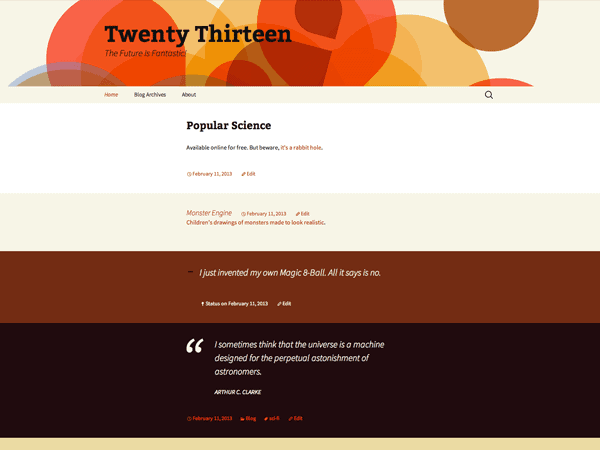
Once you have successfully installed WordPress to your domain, you’ll see a very basic yet clean site:
Your site after WP installation
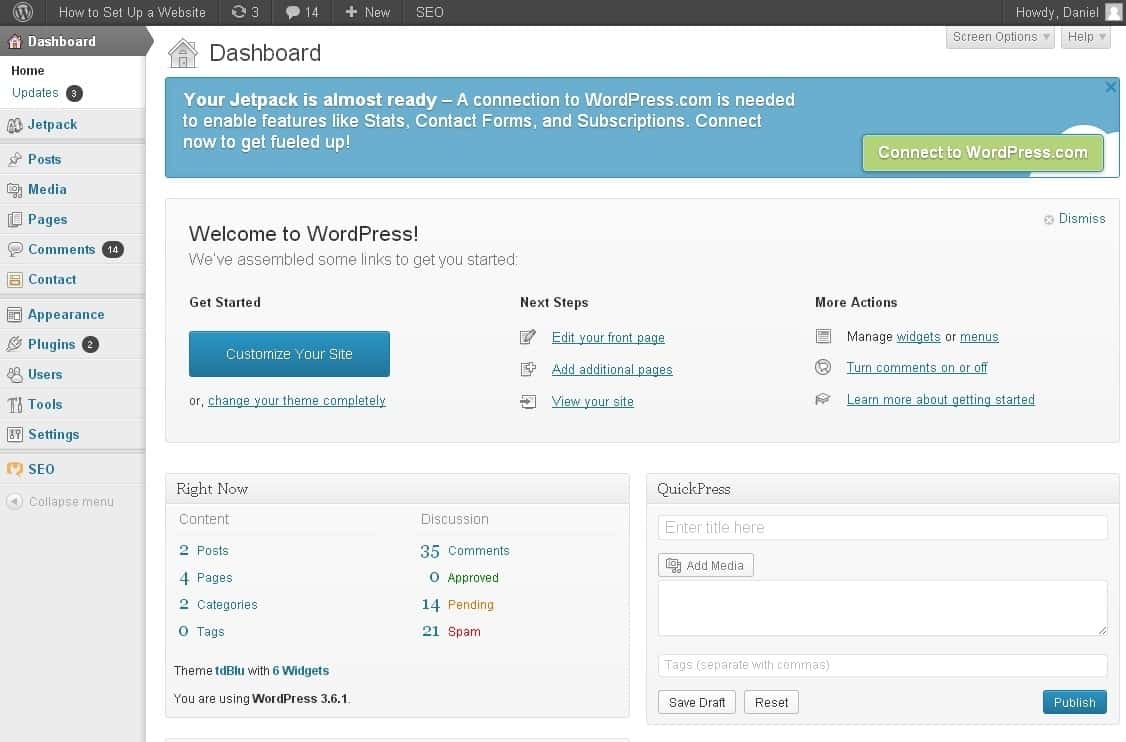
1) Log into your WordPress dashboard to change themes and start building and tweaking your site – you can log in from http://yoursite.com/wp-admin
This is your WordPress dashboard:
This is the place where you can build your site
Looks pretty awesome, doesn’t it?
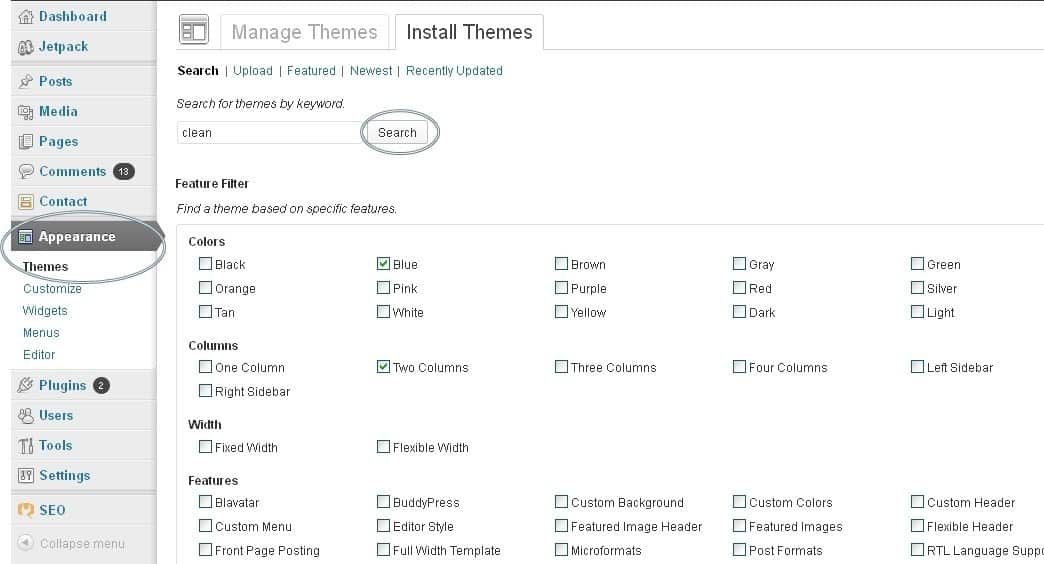
2) Now you need to start looking for a proper theme – make sure it fits with the overall topic of your new website. You can find over 1500 free themes via the WordPress Dashboard (Appearance -> Themes). If you want something more professional or elegant, head over to ThemeForest.net
However, at first I suggest you to try the free themes because some of them are actually really professional and well made.
Finding themes for your website
As you can see above, installing a new theme (outlook) for your website is very easy. All you need to do is search for specific keywords and/or use filters.
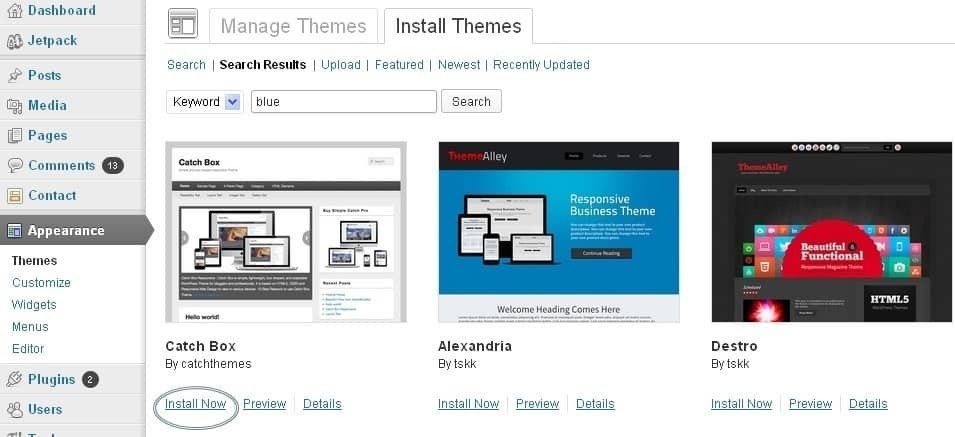
Once you have found a theme you like, click “Install” followed by “Activate”:
Installing a new outlook/design for your site
Finding the perfect theme can take a while, but it’s worth it. If you don’t find anything good right away, you can always return and search further later on. Changing themes won’t delete your previous posts, pages and content. In other words, you can change it as often as you want.
P.S: If you want a theme that works well on mobile phones, search for the keyword “responsive”.


Add content and create new pages

Once you have installed a theme you like, you can start creating content. Adding new pages in WordPress is again very easy, but I’ll cover the basics for you.
Pages: In order to create new pages such as “About Me”, “Resources” etc (like I have on the menu), you need to head over to the WordPress dashboard and look for “Pages” -> “Add New”.
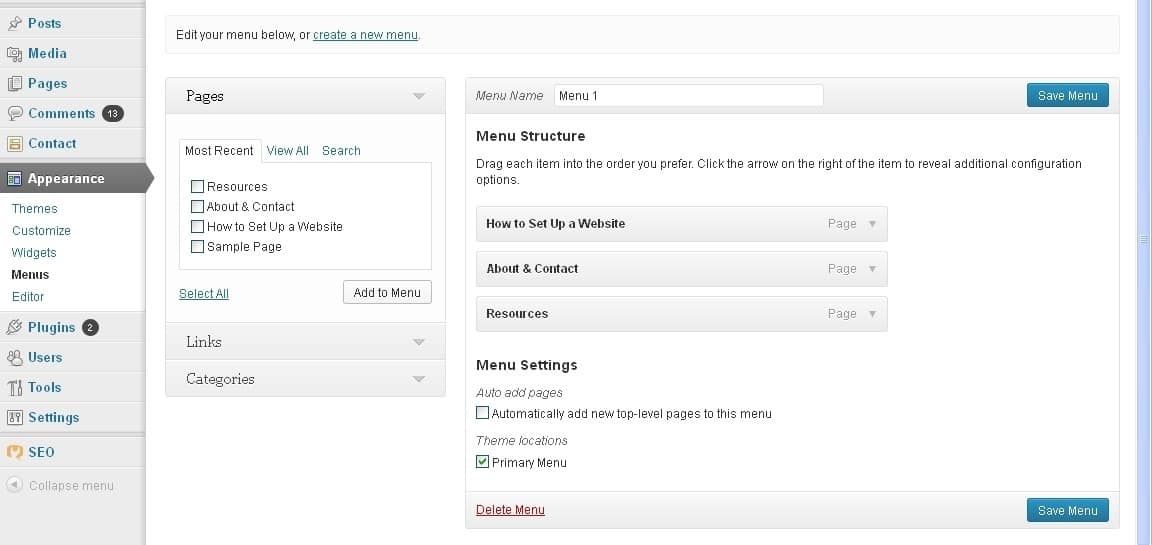
If you want those pages to appear on the menu as well, you need to go to “Appearance -> Menus” and add them to the list.
Creating a new menu for your website
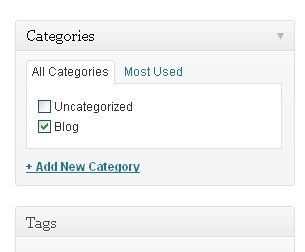
Posts: If you want to add a blog to your website, you can use different categories and posts. Let’s say you want to create a category named “blog”. To do so, simply add it to your menu and start making posts. Here’s what you need to do:
Website categories
a) Create a new category by going to “Posts -> Categories”
b) Create a blog post by going to “Posts -> Add New”. Once you blog post is ready, you need to add the right category for it.
c) Add a new category to the menu


Tweak your website (Widgets, comments & just some “stuff” you need to know)

In this section I’ll cover some of the basics things that will help you to tweak your website.
Changing website title and tagline: You probably noticed, that my website has a title: “How to Make a Website” and a tagline: “… Step by Step tutorial“.
In order to change the title and tagline on your website, go to “Settings -> General” and simply fill in the form.
General website settings
Disabling comments for Posts & Pages: Some websites (business/organisation sites mostly) don’t need any comments from visitors.
While you are writing a new page, click “Screen Options” (top right) and then tick “Discussion”. The “Allow Comments” box will appear at the bottom and all you need to do is untick “Allow Comments”.
In case you want to turn off comments on every new page by default, go to “Settings -> Discussion” and untick those options:
Here you can disable comments
Static front-page: If you want your site to have a static front page, go to “Settings -> Reading” and pick a static page for your website. If you don’t do this, WordPress will take your latest posts and start showing them on your homepage.
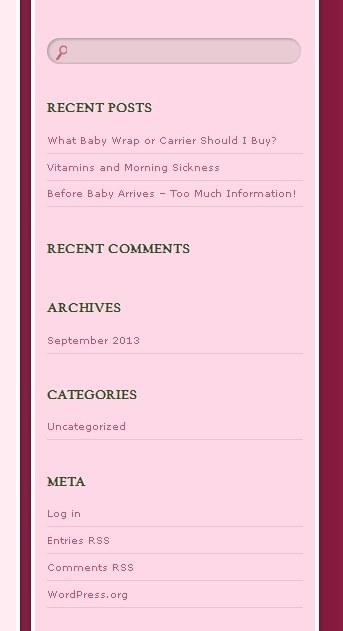
Editing the sidebar: Most WordPress themes have a sidebar on the right side (in some cases it’s on the left). By default you’ll see something like this:
This should be your default sidebar after WP installation
If you want to delete the categories, meta and archives (which are pointless in most cases) go to “Appearance -> Widgets”. From there you can use drag n’ drop to add different “boxes” to your sidebar.
There’s also a “HTML box” which is basically a text box where you can use HTML code.


Install plugins to get the most out of your website

WordPress gives you the opportunity to install different plugins that all add value and make your website more “personal” and unique.
To start installing plugins, go to “Plugins -> Add New” and simply start searching. Keep in mind that there are over 25,000 different FREE plugins.
… but before you go and install every single one, I suggest you to read this article: Things you need to know about using WP plugins. Below, I have put together a list of the most popular and useful plugins that webmasters find useful:
Contact form 7: My website has a contact form on my About Me page. It’s great, as people can simply fill in the form and send me an email without logging into their email provider. If you want the same, install Contact Form 7.
Facebook box: A lot of websites have Facebook plugins on their sidebar. A Facebook Box helps you drive more traffic and likes to your Facebook fanpage (if you have one).
Forum: Interested in starting a forum on your site? Look for the plugin named “bbPress” and follow their tutorials.
Actually there are many more plugins available. Here’s a list of the top 100 plugins for WordPress by Tom Ewer.
… and that is basically it. Now you should have a fully working WordPress website! If you need some further help, please use the contact form at the footer area.